
Build Your Setup Pack
Set up your agency details, optional systems, divisions, training paths, and ranks, then download a ZIP pack you can send over for setup.
Portal Request
Tell how you want your setup pack built, choose the extra systems you need, and download a ZIP pack ready to send over for setup.
 Agency Info
Fill in the basic agency details that should appear in your setup pack.
What belongs here?
This section fills the identity block for your pack: who the agency is, where people find it, and which Discord or Habbo references the setup should connect to.
Your full agency name
Enter the main name staff and visitors know your agency by. This is the full display name that will appear across the setup pack.
Agency abbreviation
Use the short version of your agency name, like an acronym or compact tag. This is handy anywhere the full name would be too long.
Agency website
Paste the main website link for the agency, such as the home page or public hub visitors should land on.
Badge or logo image link
Paste a direct image URL for the agency badge or logo. The link should open the image itself, not a gallery page around it.
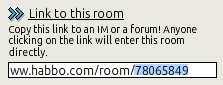
How to get the Room ID
Choose the agency timezone
Pick the timezone the agency wants the pack to use for schedules, logs, and timing-related panels.
Webhook link for a channel
Paste the Discord webhook URL for the channel that should receive these updates. If this field mentions a webhook, it wants the full webhook link.
How to copy a role ID
How to find a Badge UID
Choose only what you need
Turn on the systems your agency actually plans to use. When one needs more detail, extra fields appear automatically below.
Point System
Adds a points-based setup for tracking activity, progress, and rewards across the agency.
Special Units
Adds support for special-unit structures and related setup details in the pack.
Special Units Map
Adds a Foreign Affairs style map setup for tracking partner agencies or external unit links.
Point Screening
Adds a review layer so point submissions can be checked before they are accepted.
FTF Logs
Adds logging support for face-to-face activity records and the review details that go with them.
Rank Prices
Lets ranks carry price values in the setup if your agency uses pricing for purchases or upgrades.
Exam System
Adds exam-related roles, notifications, and delivery settings for training or promotion exams.
Point Shop
Adds a point shop path so staff can spend earned points on agency-defined rewards.
Divisions feed the rest of the setup
Each division gets an ID and a name. Training types, ranks, and promotion rules all refer back to these division IDs and names later.
Division ID
This is the stored division value other sections point to. Keep it unique for every division.
Division Name
This is the human-friendly division name people will see in dropdowns and summaries.
Training types link divisions to ranks
Each training type has its own ID and name. Ranks can point to a training type later, and the minimum division decides where that training path begins.
Training ID
This is the stored training value ranks refer to when they require a training type.
Training Name
This is the public name shown anywhere the training type appears in lists or dropdowns.
Minimum Division
Choose the earliest division that should be able to use or start this training path.
Ranks pull from divisions and training types
Each rank belongs to a division, and can optionally require one of the training types you created earlier.
Rank ID
This is the unique stored value for the rank itself.
Rank Division
Choose the division this rank belongs to. The dropdown shows division names but stores the division ID.
Training Type
Choose which training type this rank should point to when training is required. The dropdown shows names but stores the training ID.
Default rules plus division overrides
Set the base promotion timing once, then override it only for divisions that need different rules.